What's new in Zeus, October 2026
Building software is not what it used to be. A fleet of agents can now work on one product in parallel, and as long as the budget allows, there is little limit to how much they can take on. The limit is us: how far a person’s attention can stretch. That matters most when what you build lands in the hands of real users, who care about the quality of what they get.
The key problem we found is that not all work is alike. Some software can and should be built by letting agents loose on a backlog of issues, with automated reviews and tests turning their work into pull requests. And some work has to be coordinated across agents and humans, so that it adds up to a meaningful launch that users will see.
For that work, we have found a powerful construct: a technical project manager (TPM) that shepherds the work, not the agents. Each agent stays within the scope of work it laid out. New work it discovers along the way is handed off as a new task, and the TPM works out where it fits in the priorities. When we let agents keep growing the scope of their session as they go, the result is too often the AI slop we all keep cleaning up.
The latest Zeus Mode ships with a TPM agent built in, along with visual tools that show exactly what work is being done, how far along each agent is, and when it will be done, without jumping between sessions to ask the agents. That is what unlocks the next level of throughput for us, without compromising the quality of the end product.
This month’s releases are those unlocks. Between 7 and 17 October, Zeus went from 0.10 to 0.17: nine releases in eleven days.
They add up to one change. Zeus Mode is designed around one job: more gets done by your agents, and less of it needs you. The new redesign puts the actions agents need from you front and center, with more clarity. It cuts the noise. And it shows at once how each agent is getting on, tracked against a plan and against when it expects to finish.
This post walks through that change, then says where to get it.
What needs you, and nothing else
The first half of the redesign is attention. Across all your workspaces, and within each one, Zeus Mode shows the questions and tasks waiting on you: what your agents need answered, and what you need to decide, across your whole fleet. You see the details that matter, answer right there, and move on. Agents keep going.
Zeus Mode now also ships with a Scratchpad: a memory of things you deferred, or that your agents mentioned to you but that never became a task. It lives in the moment, so anything older than three days is forgotten — keeping the noise low. Your agents told you disk space was running low, but it got lost in the noise. You said you’d read the latest product update from Claude, but you haven’t yet. The Scratchpad keeps a note without you having to ask.
Project Plans, and Metis
The second half is throughput, and it is the point of the month.
A Project Plan is how agents organize their work, and how you, the human, stay in the loop while a fleet of agents powers through work at the 100x speed we have grown used to.
In the app, a plan is laid out like a kanban board of sorts, but one designed around agents working through a body of work toward a common goal. Each task is sized. Dependencies are tracked, and work is prioritized. Scope is controlled at the task level, so agents’ work doesn’t turn into slop. Gates for humans go wherever you want them. Milestones are tracked. And because these are agents, not people, the size and number of tasks can vary enormously from one agent to the next.
Each agent publishes its plan and its progress against that plan, and Zeus Mode tracks it all, with one goal in mind at all times: treat your attention as the most precious thing you have.
Zeus Mode ships with a project-manager agent, Metis. Give it your document of work, and it sets up the project plan for your agents.
Metis drafts the plan with you. It is a project-manager agent built into Zeus,
so zeus run metis works in any repository Zeus knows, on the first day, with
nothing added. You give it a document, or answer a few short questions, or
both. It drafts the whole plan — every step, who takes it and why, which steps
are yours — and shows it to you once, in plain words. When you say go, it files
every step as a task on the board. It never starts an agent, never takes a
task, never writes code, and never answers a question that is yours.
That is what lets you run a fleet of agents over days, and even weeks, without losing track of the larger goal they are all working towards. The agents take the steps. The plan holds the goal. You do the thinking and the planning.
The guide Planning work across agents with metis → walks through a plan from its first question to its last step.
See where a plan stands
Open a plan in the app and one line marks “you are here”.
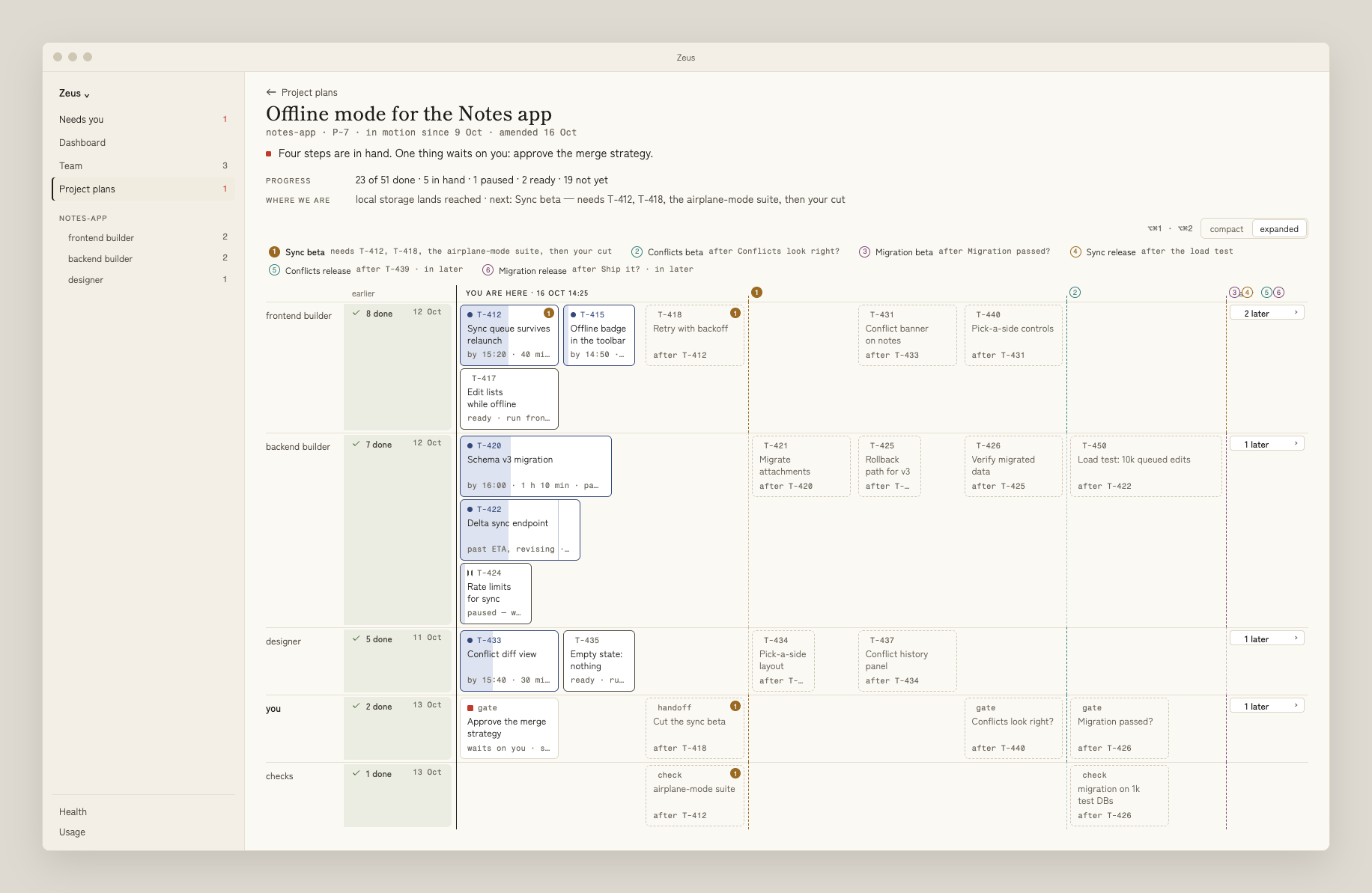
One plan, five lanes. Finished steps on the left, steps in hand on the “you are here” line, what comes next on the right, and the milestones ahead numbered along the top.
A bonus if you work in a team: your teammates see your project plan and its progress too, as it moves.
Explorations, with Daedalus — in testing
Not every piece of work starts as a plan. Some of it starts as an idea that is not yet work.
Daedalus is a new agent built into Zeus for that: a research and thought partner. It thinks a product idea through with you over several sittings — a brainstorm, then research by a helper, then a better document — and keeps one running document for it, refreshed every sitting. Each sitting is a round, and each round ends with one question for you: go on, shelve it, or hand it to Metis.

The path from a thought to work on the board. Each arrow is a question you answer; nothing moves on its own.
How to get it
| Already have Zeus | New to Zeus |
|---|---|
| Installed from the download: it updates itself. To check now, choose Zeus ▸ Check for Updates… in the menu bar. | You need a Mac with macOS 14 or newer, and Claude Code or Codex installed on it. |
Installed with Homebrew: run brew upgrade zeus, open Zeus, and press Set Zeus up when it asks. | Download Zeus from zeusmode.ai/download → and drag it to your Applications folder, or run brew install zeus-mode/tap/zeus. Then open Zeus and follow the set-up screen. |
The download is at https://zeusmode.ai/download/.
One thing Zeus does not do, in any of these releases: it does not run your agents. It shows you what they need, and you answer. When it comes to how you code — you do you. Zeus is there to unlock your attention so you can go a magnitude faster. Or two.