Can I see my Claude Code and Codex sessions in one place?
You use Claude Code for some work and Codex for other work, often at the same time, in different terminals. This page shows how Zeus Mode puts both in one list.
Checked on 11 November 2026 with Zeus Mode 0.35.0 on macOS 27.0.1, with Claude Code 2.1.322 and Codex 0.166.0. The pictures were taken on that build, in a small demo project called tinytodo.
The short answer
Yes. Zeus Mode for Claude Code and Codex is a Mac app with a small background
program. The background program reads the session records that Claude Code
and Codex keep on your Mac, so it sees the sessions of both tools. You keep
starting them the way you do now — claude and codex in your own terminals
— and the app lists them together.
Zeus Mode works with these two tools and no others. To see what else it needs, read What does Zeus Mode work with?.
Before you start
- Zeus Mode on your Mac, set up and running. If you do not have it yet, follow Getting started with Zeus Mode.
- Claude Code, Codex, or both, on the same Mac.
- A repository in a workspace. A workspace is the group of repositories one Dashboard shows; its name is at the top left of the window. Start your sessions in one of its repositories, with that workspace picked.
1 · Start one session of each
In that repository, start Claude Code in one terminal and Codex in a second one, and give each a small piece of work:
claude
codex
2 · Open Sessions in the app
Open Zeus Mode: the app is called Zeus in your Applications folder. On the Dashboard, pick Sessions in the bar. Both sessions are in the same list, one row each:
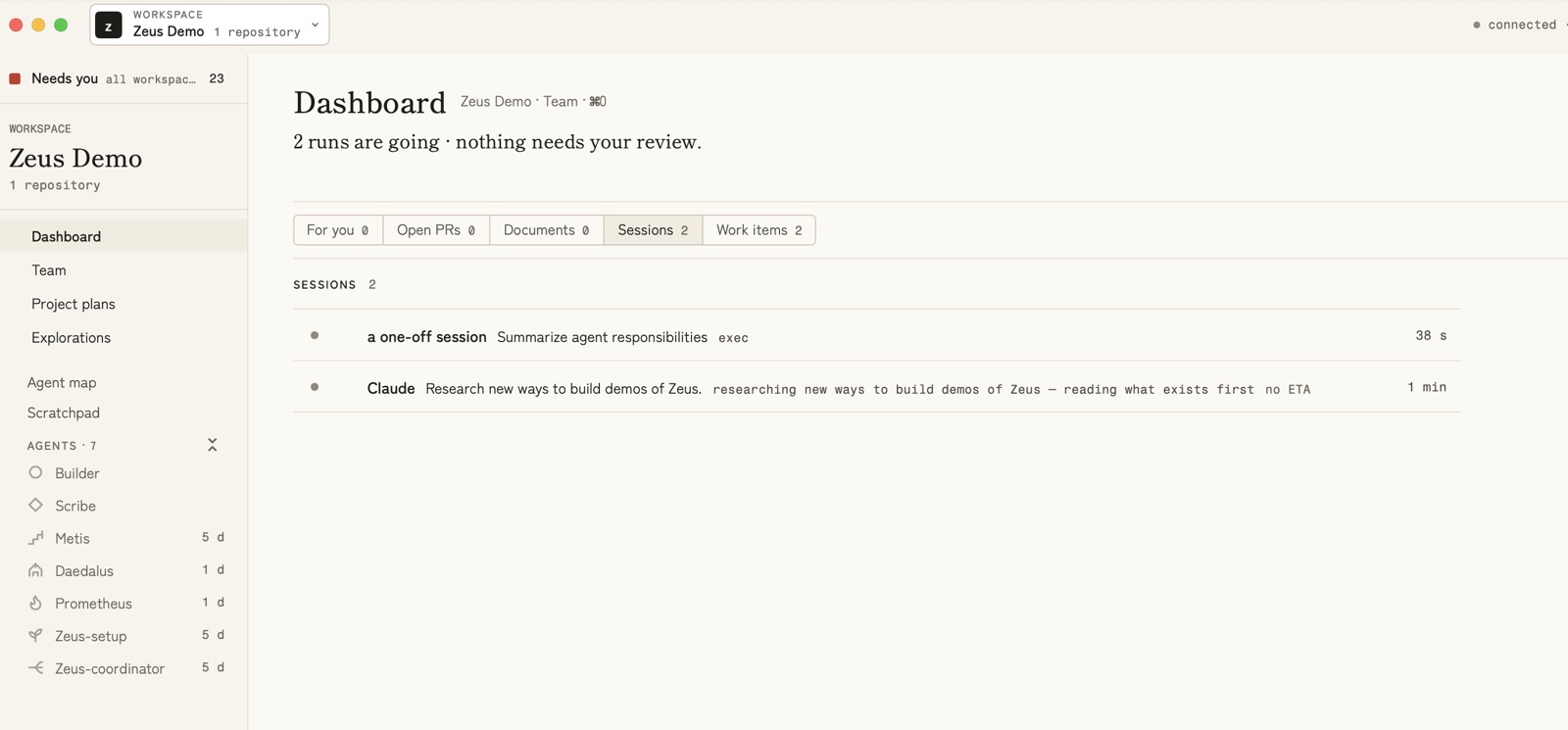
Each row shows:
- a name. The row does not print the tool’s name. A session that works
as an agent shows the agent’s name. A session with no agent name is called
a one-off session — like the Codex session here. The Claude Code
session here had given itself the agent name
claude, so its row says Claude; without it, it too would be a one-off session. - the work it was given, for example “Summarize agent responsibilities”.
- what it is doing now: the step it says it is on, or the last thing it
did (here
exec, a command the Codex session ran). - how long it has been running.
3 · When one of them waits for you
In the pictures, each session waited for the owner in its own way:
- The Claude Code session asked a question. Its question appeared on the Dashboard under For you, and in Needs you under Questions, with its choices. This session had an agent name; the app’s own words on that page are “A question an agent there asks appears here.”
- The Codex session finished its work and waited for its next message. It was listed under Sessions, in the group OPEN, WAITING FOR YOU, with how long it had waited:
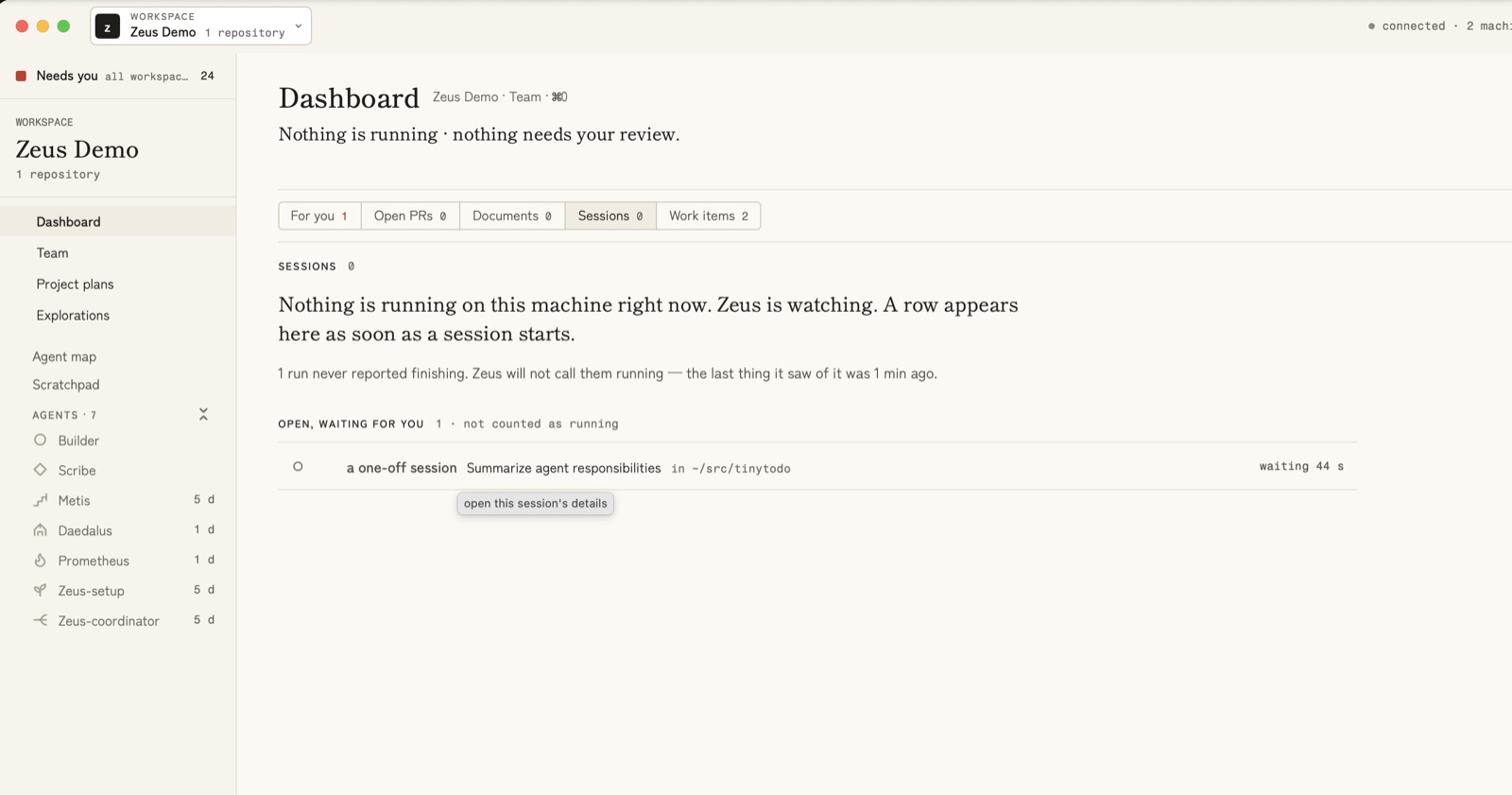
You answer in the session’s own terminal, as you always do. Zeus Mode shows you where; it does not answer for you.
Which of my coding sessions needs me? walks through the question from start to end, with a picture of each step.
Next
- Do I need Zeus Mode? A comparison puts Zeus Mode beside Claude Code’s own agent view and other tools, so you can decide.