Your team's todo list
Your team keeps one short list of what people owe — renew a certificate, send an invoice, call the bank. Anyone can add to it from a Claude or Codex session, in plain words, and everyone sees the same list, sorted by priority.
Checked on 18 November 2026, on macOS 27.0.1, with Zeus Mode 0.41.0
for Claude Code and Codex. The parts on near matches, the Given to you
tab and Make a task… came in 0.37.0. The keys in the Agent and
Assigned to lists, Undo after Mark done, and Put back on the
list came in 0.38.0. The session steps were checked against Zeus Mode’s
todo tool for Claude Code 2.1.322, not run.
The team list belongs to a workspace: a named group of repositories that you choose in the picker at the top of the rail (the list down the left side of the Zeus Mode window). Everyone on the team who works in those repositories shares one list.
The list is for what people owe, and for loose follow-ups. It is not the agents’ work board: an item on the list starts no agent. Work for an agent still goes on the work board, as Getting started shows. When an item turns out to be work for an agent, you can make it a task (see Make an item a task, below).
Before you start
The list is kept as small files in a private repository on GitHub, which
Zeus Mode makes when someone adds the first item. We call it the list’s place. Zeus Mode calls it
the workspace’s instructions home, or just home, in its messages: it is
the same repository that holds the workspace’s ZEUS.md file, which Zeus Mode
gives to every session. Zeus Mode copies the list to each Mac and writes each
change back to GitHub.
What a teammate needs before they can change the list
Every person who changes the list needs four things:
Zeus Mode, new enough to have the team list, and set up on this Mac. Getting started shows how to set it up. To check that your Zeus Mode has the team list, run:
zeus todo --helpIt prints the
zeus todocommands, and its first line says that every item has a priority, P0, P1 or P2. If it saysunknown command "todo", your Zeus Mode is older than the team list: see Keep Zeus Mode up to date.The repository in a workspace on this Mac. Open the workspace picker at the top of the rail. If you do not have one yet, choose New workspace… at the foot of its menu, give it a name, tick the repository, and press Save.
The GitHub command-line tool,
gh, installed and signed in. Zeus Mode uses it to find or make the list’s place: Joining a team shows how. You never make the list’s place by hand: the first item makes it (see the next two sections).Write access to the list’s place on GitHub. To read the list, read access is enough. To change it, GitHub must let you push to that repository.
Who can give you access: the person or the organisation that owns the list’s place on GitHub. If an organisation owns it, an owner of that organisation can add you. If one person’s own account holds it, only that person can invite you. Zeus Mode names them in the sentence it shows when you cannot write yet (below).
The first person on the team: add the first item
In a workspace with no list yet, the Todo page says Nothing on the team’s list. A quiet line under it says where the list will be kept, for example:
Zeus makes the team list's place, github.com/acme/zeus-instructions, when you add the first item.
Press + Add item, type the title, choose a priority, and press Save.
Zeus Mode makes the private repository on GitHub, records it with your team,
and adds the item. You run no command. Adding the first item from a session,
or with zeus todo add, does the same, and the reply begins:
Made the team list's place, github.com/acme/zeus-instructions, and added 4f1 “Send the pricing page”.
The repository is <owner>/zeus-instructions, where <owner> is the GitHub
account or organisation that owns the workspace’s repositories. If GitHub
does not let you make it there, or that name is taken, Zeus Mode makes
<you>/zeus-instructions-<workspace> under your own account instead. In
this case the reply also says who needs an invitation to it, for example:
Zeus made it under your own GitHub account, so every teammate needs an invitation to it before they can read or change the list.
Then make sure every teammate can write to the new repository. When it is under one person’s account — the line above, or a workspace whose repositories belong to a person rather than an organisation — that person must invite each teammate on GitHub, with write access. When it is under an organisation, each teammate needs write access to it there.
If Zeus Mode cannot make the list’s place, it adds nothing, and the panel stays open with your words and the sentence that says why (see When something goes wrong, below).
Every other teammate: nothing to run
Once someone has added the first item, there is nothing for you to run. While Zeus Mode is running, your Mac looks for the list’s place every ten minutes, and uses it as soon as it finds it. All you need is access to it on GitHub (see Who can give you access, above). Until you have access, GitHub hides a private repository from you, and Zeus Mode cannot find it.
When you have joined the team in Zeus Mode (see Joining a team), your Mac learns the list’s place from the team. If you add an item before your Mac has found the list, the line under the empty list names the team’s place, and your item goes there:
Zeus uses the team list's place, github.com/acme/zeus-instructions, when you add the first item.
One case needs a command. If your Mac is not on the team in Zeus Mode,
it finds the list’s place by itself only when it is
<owner>/zeus-instructions. If the place is under one person’s own
account, ask that person for its name, get access, and give it to Zeus Mode
once, with Zeus Mode running. <workspace> is the workspace’s name on your
Mac:
zeus workspace home create "<workspace>" --repository rami/zeus-instructions-acme
If Zeus Mode says GitHub would not make github.com/rami/zeus-instructions-acme: …,
you do not have access yet: wait for it, then run the command again. Running
it again changes nothing once the place is known.
On a Mac that is not on the team, add nothing until the list shows. Without the team, your Mac cannot tell a list it may not open yet from no list at all. An item added before then can make a second list, under your own account. Wait until you have access and the team’s items appear.
If your Mac cannot open the team’s list
When your team records a place that your Mac cannot open, the Todo page says who keeps it, for example:
rami keeps the team list for Acme in github.com/acme/zeus-instructions, which this Mac cannot open. Ask rami for access, or, if it is gone, make a new place.
Ask that person for access. You cannot add items until you have it. Once GitHub lets you open the place, your Mac uses it by itself.
If a teammate moved the list to a place your Mac cannot open, your Mac keeps the list as it last read it, and says:
sam moved the team list for Acme to github.com/sam/zeus-instructions-acme, which this Mac cannot open. Ask sam for access; this Mac moves to it by itself once you can open it.
When the list’s place is gone: Make a new place
If the list’s place was deleted, or nobody can give you access, press Make a new place. Do not press it only because you are still waiting for access: it moves the whole team to a new place, and the items on the old one stay behind. The button is under the sentence “… keeps the team list for … which this Mac cannot open”, on the Todo page, so anyone on the team whose Mac shows that sentence can press it. It is there only in the app.
Zeus Mode makes a new private repository, in the same way as for the first item. It records the new repository with the team in place of the old one, and every teammate’s Mac moves to it by itself. Items on the old place are not copied, because your Mac cannot read them: add again the items you still need. The reply says:
Made github.com/<new> the team list's place in place of github.com/<old>; every teammate's Mac moves to it by itself.
If the new repository is under your own GitHub account, invite each teammate to it on GitHub, with write access, as for the first item.
The same button shows when your list’s place stops opening while you use it: the Todo page keeps the items as your Mac last read them, with the sentence and the button above them. Before you press it, note the items you still need, so you can add them again.
If you cannot write to it yet
If GitHub refuses your change, Zeus Mode tells you which repository and who can give you access, and changes nothing:
You cannot write to the team list's place, github.com/acme/zeus-instructions, yet, so nothing changed; an owner of the acme organisation can give you access.
If you can read that repository, you can still read the list. Zeus Mode does not keep your change: ask again once you have access.
Use it from a session
In a Claude or Codex session in one of the workspace’s repositories, say what you want in your own words. For example:
- “show the team list”, or “show my todos”
- “add ‘renew the certificate’ for Rami, P0”
- “make 2d1 P2”
- “give 2d1 to Mia”
- “2d1 is for hephaestus”
- “059 is done”
- “remove 2d1”, or “undo that”
- “make 2d1 a task for hephaestus”
The assistant uses Zeus Mode’s todo tool. Every new item needs a priority: if
you do not give one, the assistant asks you before it adds the item. Every
change is recorded as yours, made through that assistant, and every reply
shows the rows that changed and how to undo each one. An assistant changes
the list only when you ask, with one exception: suggestions (below).
Priorities
Every new item gets a priority:
| Priority | Use it for |
|---|---|
P0 | What must happen first. |
P1 | What comes next. |
P2 | What can wait. |
The list shows the P0 items first, then P1, then P2. Inside each priority, the item that changed most recently is first. There is no other order: you do not move items up or down. To move an item, change its priority.
The team list of Acme (github.com/acme/zeus-instructions)

P0
  609 · Renew the TLS certificate · Rami
P1
  059 · Call the bank about the card limit · Rami
  2d1 · Book the team offsite · nobody
P2
  f33 · Pin the Go version · nobody · hephaestus
Folded: 1 done, 1 removed, 1 became a task (list them with --part).
Each row shows the item’s short id (three characters, such as 048 or
4b2, and sometimes more), its title, its owner and, when it has one, its
agent. You use the id to change the item. The owner is one person of the
team, by GitHub login or name, or nobody: on a team, any other name is
refused, and the message lists who you can choose. Done, removed and suggested items, and items that became a task, are
not shown in the list: the last line, Folded: …, counts them, and
zeus todo list --part done (or suggested, removed or tasks) shows
them.
An item added without a priority is refused, and nothing changes:
An item needs a priority, P0, P1 or P2; nothing changed.
Items made before the list had priorities are shown in a last group, No priority, until someone gives each one a priority.
An item’s agent
An item may also name the agent that should do it, such as hephaestus.
The agent is only a note on the item: naming it starts nothing. You can name
an agent declared in any repository of the workspace that is checked out on
this Mac, one of Zeus Mode’s own agents, or none. If a repository of the workspace is not checked out on
this Mac, Zeus Mode cannot read its agents, so it takes any name. Otherwise, a
name that no repository declares is refused, and the message lists the agents
you can choose:
Zorro is not an agent declared in this workspace: hephaestus, metis, daedalus, prometheus, zeus-setup, zeus-coordinator or none; nothing changed.
Use it from a terminal
The same list, from a terminal, inside one of the workspace’s repositories:
| Command | What it does |
|---|---|
zeus todo list | Shows the list: P0, then P1, then P2. |
zeus todo list --mine | Shows only your items. An item is yours when its owner is your GitHub login, your name, or your first name. |
zeus todo list --part done | Shows the done items. Use suggested, removed or tasks for those parts. |
zeus todo add "Book the team offsite" --priority P2 | Adds an item at P2, with nobody as its owner. |
zeus todo add "Renew the TLS certificate" --priority P0 --owner Rami | Adds an item for Rami at P0. |
zeus todo add "Send the invoice to Globex" --priority P1 --owner Mia --note "The PO number is in the thread from Rami." | Adds an item with a longer note under it. |
zeus todo add "Pin the Go version" --priority P2 --agent hephaestus | Adds an item that names an agent. |
zeus todo edit 2d1 --priority P1 | Changes an item’s priority. --title changes its words, --note its note, and --agent <name> (or --agent none) its agent. |
zeus todo assign 2d1 Rami | Gives an item to Rami. zeus todo assign 2d1 --nobody gives it to nobody. |
zeus todo done 059 | Marks an item done. |
zeus todo remove 2d1 | Moves an item to Removed. Nothing is ever deleted. |
zeus todo move 2d1 | Brings a done or removed item back onto the list. |
zeus todo undo 2d1 | Undoes your own newest change to the item. A second undo redoes it. |
zeus todo to-task 609 --for hephaestus --summary "…" | Makes an item a task (see Make an item a task, below). |
zeus todo look | The weekly look (below), whenever you want it. |
zeus todo reach | How long the last change from a teammate took to reach this Mac. |
If the repository is in more than one workspace that has a list, add
--workspace "<workspace>" to say whose list you mean.
When a command refuses, the terminal puts the command’s name first, for
example zeus todo add: An item needs a priority, P0, P1 or P2; nothing changed. This page quotes the sentences without it.
Every change prints the changed row and its undo:
$ zeus todo add "Renew the TLS certificate" --priority P0 --owner Rami
609 · P0 · Renew the TLS certificate · Rami
undo: zeus todo undo 609
Undo undoes only your own changes. If a teammate changed the item after you, Zeus Mode says so and changes nothing — unless your change and theirs met at the same moment (see below): then undo puts yours back.
Something already on the list
Before you add an item, Zeus Mode compares its words with the items already on the list and with the open tasks on the work board. Zeus Mode compares words, not meaning: “renew the cert” and “renew the certificate” do not match.
A close match is updated instead. Adding “Renew the TLS certificate for the API” when “Renew the TLS certificate” is on the list changes that item’s words, and the reply begins
updated 609:. If your words add nothing new, the reply saysAlready on the list as 609; nothing changed.A near match is asked about, and nothing changes:
Nothing changed: this is close to 059 "Call the bank about the card limit" (P1). Add it again with --match new to make a new item, or --match 059 to update that one.In a session, just tell the assistant which one you meant.
When the close match is done, removed, or already a task, Zeus Mode always asks
and changes nothing. Add it again with --match new to make a new item, or
bring a done or removed one back with zeus todo move <id>. When an open
item (on the list or in Suggested) is also near, the reply names it too,
and you can update that one with --match <id>:
Nothing changed: this is close to b21 "Call the bank about the card fee" (Done) and 315 "Call the bank about card fees" (P2). Add it again with --match new to make a new item, or --match 315 to update that one; move brings b21 back.
Meeting notes and suggestions are compared too. A proposal from meeting notes
that is close to an item says so in the numbered list (would update 489 (close match)), so you see it before you accept. A session’s suggestion
that is close to an item on the list adds what the session saw to that item,
and makes no new one. Close to a done or removed item, or to a task, a
suggestion changes nothing. As when you add, the reply also names an open
item that is near, so the session can add what it saw there.
Suggestions from sessions
Sometimes a session notices something real that is not part of its work, and not clear enough to be a task. It may leave it on the list as a suggestion, with what it saw, where, and why someone should come back to it. This is the only change a session makes without being asked.
- A suggestion goes into Suggested, which is not shown in the list. It has no owner and no priority.
- One session makes at most 3 suggestions.
- To see them:
zeus todo list --part suggested, or “show the suggestions”.
You decide what happens to each one:
| Command | What it does |
|---|---|
zeus todo keep 5dc --priority P2 | Moves the suggestion onto the list, at the priority you give. A keep without a priority is refused. |
zeus todo drop 7dd | Moves it to Removed. A dropped suggestion is never suggested again. |
zeus todo same-as f03 4b2 | Says it is the same as another item: what the session saw is added to 4b2, and the suggestion is removed. |
A suggestion that nobody keeps leaves Suggested after 14 days. It is moved to
Removed, not deleted: zeus todo keep <id> --priority <P0, P1 or P2> brings
it back.
To switch suggestions off, or on again, for everyone on the workspace’s list:
zeus todo suggestions off
zeus todo suggestions on
Meeting notes
Paste your meeting notes into a session and ask for the list to be updated. The assistant reads the notes against the list and shows you a numbered list of proposed changes — new items, changed items and done items — each with the sentence from the notes that it came from. Each new item has a priority:
Proposed changes from Monday sync, 10 November:
1. new · "Order new laptops" · P2 — said: «Someone should order the new laptops.»
2. done · 2d1 "Book the team offsite" — said: «The offsite is booked.»
3. new · "Call the insurer" · Rami · P1 — said: «Rami will call the insurer.»
Nothing changes yet. Answer with “all”, “none”, “all but 3”, or the numbers you want, such as “1 2”. Only then does the list change, all in one step. When the notes are not sure who will do something, the item is left with no owner.
If a teammate changes one of those items before you answer, Zeus Mode applies nothing and shows you the list again, so you never accept a change you did not see.
From a terminal, the same two steps take a file of proposals, as
zeus todo --help describes. The file is a list of proposals in JSON, each
one {"change": "new|edit|done", "item", "title", "owner", "priority", "said"}.
A new one needs a priority:
zeus todo apply-notes --meeting "Monday sync, 10 November" --file notes.json
zeus todo apply-notes --meeting "Monday sync, 10 November" --file notes.json --accept "all but 3" --key f549bd
The first command shows the numbered list and a key, and changes nothing. The second applies the changes you accepted; use the key the first command printed.
Make an item a task
Sometimes an item on the list is really work for an agent. You can make it a task on the work board, for the agent you choose. The task is filed with your own words, and the item moves to Became a task, with the task’s number. There are three ways:
In a session: “make 609 a task for hephaestus”. The assistant asks for what you want done, in your words, and files the task with them.
In a terminal: in your own terminal, not inside an assistant’s session:
zeus todo to-task 609 --for hephaestus --summary "The TLS certificate will be renewed before it runs out." --words "renew it this week"--summarysays what will be different once the task is done.--wordsis what you want done, in your own words. Zeus Mode prints the task it made, then the item’s new row:609 · Became T-1 · Renew the TLS certificate · Rami undo: zeus todo undo 609 puts the item back on the list; T-1 stays on the boardIn the app: open the item (see In the app, below) and press Make a task…. Choose the agent under For, check the Summary (it starts as the item’s title) and Your words (they start as its note), write Done when if you want, and press Make the task.
If Zeus Mode finds an open task close to the item, the sheet stops before it files anything. A shaded box names that task. Choose one:
- Add to T-n adds your words to that task, and the item moves to Became a task with its number.
- Make a task of its own files a new task. You can add a note in How it differs.
- Cancel changes nothing.
If the close match is an open GitHub issue, you cannot add to it here. The sheet offers only Make a task of its own and Cancel.
zeus todo list --part tasks shows the items that became tasks.
In the app
In the Zeus Mode app, the list is on a page of its own, Todo. The Team page does not show it.
The Todo page
The Todo page is under Team in the list down the left side of the window, with the number of items beside it. It is there also before the list has its first item.
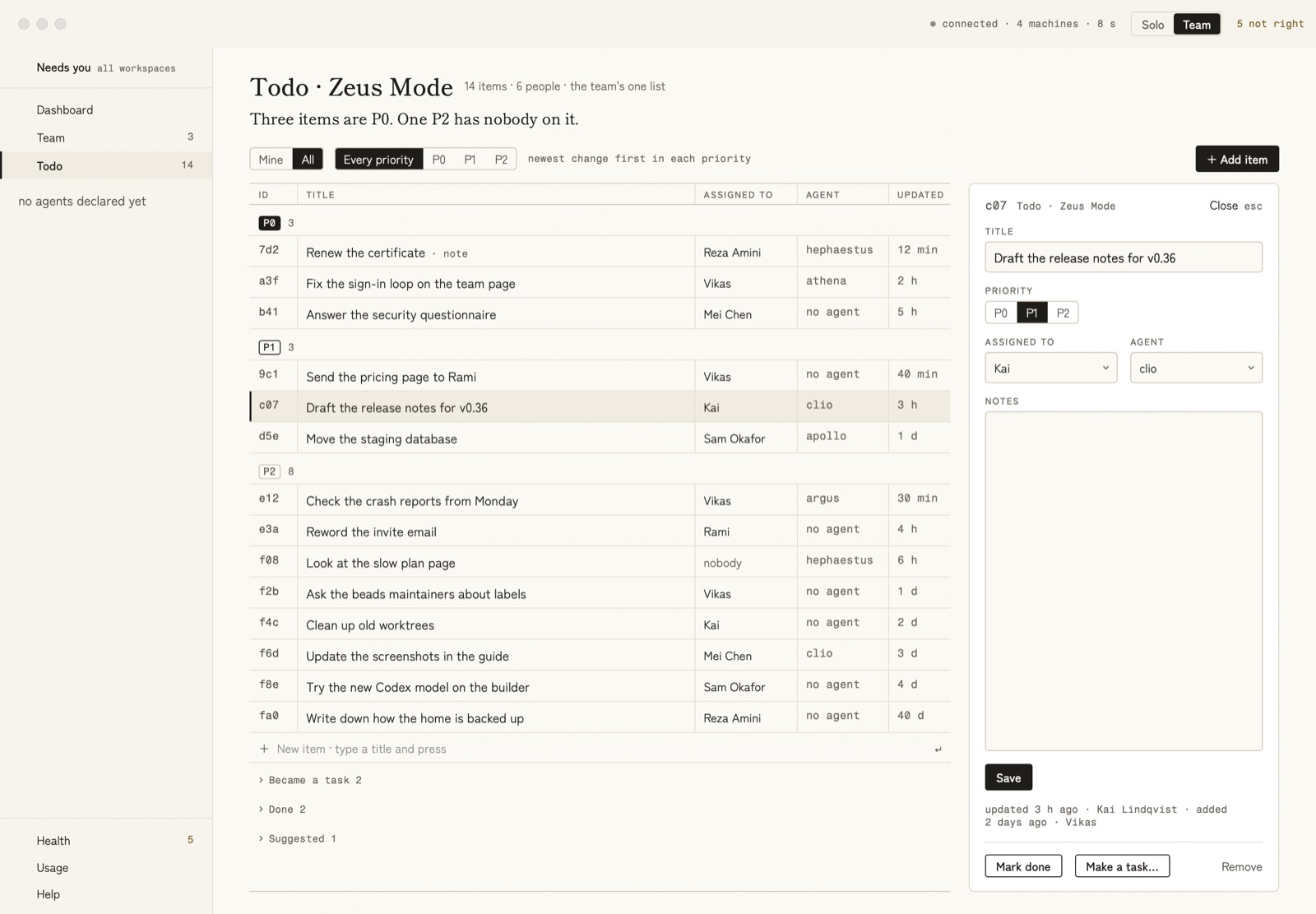
The Todo page with an item open at the side, drawn by the app’s own tests from made-up people and items. Click it to see it full size.
- Mine | All shows your items or everyone’s. Every priority | P0 | P1 | P2 shows one priority, or all of them.
- The table shows every item in groups, P0, P1, P2 and, when an item has none, No priority, the newest change first in each.
- Click a row to open it in the panel at the side (below).
- To add an item, type its title in the last row (New item) and press Return; it gets P1. Or press + Add item, fill in the panel, priority included, and press Save.
- Under the table, Became a task, Done and Suggested are folded. Each suggestion has Keep and Drop. Keep asks for the priority the item gets: click P0, P1 or P2.
- Click a row under Done to open it. A done item cannot be changed. Its
panel shows a Done line that says when it was done and by whom, and
its title, priority, owner, agent and notes. To bring it back, press
Put back on the list: the item goes back to the top of its priority.
You can also press Remove. From a terminal,
zeus todo move <id>does the same as Put back on the list. - When you press Mark done or Remove, a line takes the item’s place:
Marked “<the title>” doneorRemoved “<the title>”, with Undo (or ⌘Z). Undo puts the item back where it was. The line stays until you open another item, add one, or leave the page. After that, you can still undo from a terminal withzeus todo undo <id>. If Zeus Mode cannot undo, the line says why.
In the panel. There you can change an item’s Title, its Priority (P0, P1 or P2), who it is Assigned to, its Agent and its Notes. Assigned to lists every teammate by name, or by GitHub login when Zeus Mode has no name for them.
Click Assigned to or Agent to open its list. You can also use the keyboard. ↑ and ↓ move a highlight up and down the list. From the last row, ↓ goes back to the first row, and from the first row, ↑ goes to the last. Return chooses the highlighted row, as a click does. The last row is nobody (in Assigned to) or no agent (in Agent). Esc closes only the list. Press Esc again to close the panel.
Nothing is saved until you press Save, under Notes (or press Return in the title). While it saves, the button is grey and reads Saving…; the panel closes once the item is saved. If Zeus Mode refuses the change, the panel stays open with the sentence that says why, and you can press Save again. Only the refused part is not saved: what Zeus Mode already took stays. Close, or the esc key, closes the panel and keeps none of the changes you have not saved. At the bottom are Mark done, Make a task… and Remove (for a done item: Put back on the list and Remove).
Given to you
When a teammate gives you an item, a Given to you card appears on the Needs you page, at the top of the rail. The page counts it in its first line: “1 is given to you.” after the other counts, or “1 item is given to you.” when nothing else waits. A Given to you tab sits between Pull requests and To read. The card shows under All and Given to you: for every workspace when you look at all of them, and for one workspace’s own list when you pick that workspace. When you pick a single repository, no card shows. Show on the Todo page › opens the Todo page with the item open in the panel, and Mark read puts the card away.
When two people change an item at the same moment
When two people change different things on the same item at the same moment,
both changes are kept. When they change the same thing — say, both reword
it — the newer change stays, and the row says also changed by <name>. The
reply to the newer change shows the other person’s words, and an undo
command that brings their words back. The older words are kept in the
list’s history on GitHub.
What Zeus Mode tells you on its own
At the start of a session in one of the workspace’s repositories, Zeus Mode tells
you in one line when a teammate assigned an item to you (with assign, or
“give it to …” in a session) since you last heard, for example:
Zeus: on the team list of Acme, Rami Haddad gave you 0c0 "Book the team offsite".
Once a week, also at the start of a session, Zeus Mode shows the weekly look: the items on the list that nobody owns, and those nobody has touched for 30 days. You decide what to do with each: finish it, reword it, give it another priority, or remove it. Zeus Mode never closes or removes a kept item because of its age: only a suggestion nobody kept leaves after 14 days. To see the look at any time:
zeus todo look
A change a teammate makes usually reaches your Mac within about a minute,
while Zeus Mode is running. zeus todo reach says how long the last one took:
The last change from a teammate (Rami Haddad: 0c0 given to Rami) took 1 second to reach this Mac: written 01:33:42 on their Mac, seen here 01:33:43. The two Macs' clocks may differ.
The list on GitHub
Anyone who can read the list’s place can read the list on GitHub, without
Zeus Mode: open TODO.md in that repository. Zeus Mode writes that page again after
every change, with the P0, P1 and P2 items, and the done items and the items
that became tasks folded away.
Do not edit TODO.md or the files in todo/ by hand. Zeus Mode writes over an
edit to TODO.md, and shows a file in todo/ that it cannot read as a
fault instead of reading it.
When something goes wrong
| What you see | What it means |
|---|---|
This folder is in no workspace with an instructions home, so there is no team list here; … | This repository is not in a workspace with a list’s place on this Mac. Add it to a workspace (Before you start), then add the first item, or let your Mac find the team’s list. |
<workspace> has no shared place for its team list yet. … | Nobody has added an item yet, or your Mac has not found the team’s list yet. Add the first item (The first person on the team), or wait for your Mac to find the list (Every other teammate). In a session, the assistant may ask once whether to make the list’s place (zeus todo make-home does the same): say yes only when nobody on your team has a list yet. |
<who> keeps the team list for <workspace> in github.com/…, which this Mac cannot open. … | Your Mac cannot open the team’s list’s place. Ask that person for access, or, if the place is gone, press Make a new place (If your Mac cannot open the team’s list). |
<who> moved the team list for <workspace> to github.com/…, which this Mac cannot open. … | A teammate moved the list somewhere you cannot open yet. Ask them for access; your Mac then moves by itself. |
Zeus could not reach GitHub, so the team list's place was not made and nothing was added. Your words are still here: try again. | Your first item could not make the list’s place, because GitHub did not answer. Check your connection and try again: press Save again in the app, or run the command again. |
Zeus needs the GitHub command-line tool, gh, installed and signed in, to make the team list's place; nothing was added. | Install gh and sign in (Joining a team), then add the item again. |
GitHub would not make github.com/…: …. Nothing was added. | GitHub refused to make the repository, in your organisation and under your own account. GitHub’s own words follow the name. After zeus workspace home create --repository, it means you do not have access yet (Every other teammate). |
Zeus could not reach the team service to record github.com/… as the team list's place, so nothing was added; try again. | The repository was made, but your team could not be told about it. Add the item again. |
Zeus is not running, so no home was made: … | Open the Zeus Mode app, then try again. |
This Mac can open github.com/…, so the team list stays there; nothing was made. | Make a new place found that your Mac can open the list’s place after all. Nothing moved: keep using it. |
<who> already moved the team list to github.com/…; Zeus uses that. | A teammate made a new place first. Your Mac uses theirs. When the reply goes on Zeus also made github.com/… a moment too late; it holds nothing of the list and you may delete it., you may delete that spare repository on GitHub. |
This team's service cannot record a new place yet, so the list did not move. | Your team’s service is older than Make a new place. Nothing moved. When the reply names a repository Zeus Mode made for it, that repository holds nothing of the list and you may delete it. |
You cannot write to the team list's place, …, yet, so nothing changed; … can give you access. | GitHub refused your change. Ask the person it names for write access. |
An item needs a priority, P0, P1 or P2; nothing changed. | Add the item again with --priority P0, P1 or P2. A keep needs one too. |
The list has no hand-made order now: … | --to, --before and --after no longer work. Give the item a priority instead. |
<name> is not a person of the team: …; nothing changed. | On a team, an owner must be a teammate. Choose one of the names the message lists, or nobody. |
<name> is not an agent declared in this workspace: …; nothing changed. | No repository of the workspace on this Mac declares that agent. Choose one of the names the message lists, or none. |
zeus todo to-task: the owner makes an item a task in their own terminal, not from an agent's session … | You ran zeus todo to-task inside a Claude or Codex session. Ask the assistant there, or run it in your own terminal. |
Nothing changed: this is close to … | Your new item is near one already on the list. Add it again with --match new or --match <id>. |
This session has already made 3 suggestions, the limit for one session (ADR-010); nothing changed. | A session may leave only 3 suggestions. (ADR-010 is the name of the Zeus Mode decision that set the limit.) |
Suggest is a session's own door, and Zeus could not tell which session this is; nothing changed. | Only a session can leave suggestions: zeus todo suggest works only inside a Claude or Codex session. In a plain terminal, use zeus todo add. |
<name> changed <id> last (…), and undo puts back only your own newest change, so nothing changed. | A teammate changed the item after you. Change it yourself instead of undoing. |